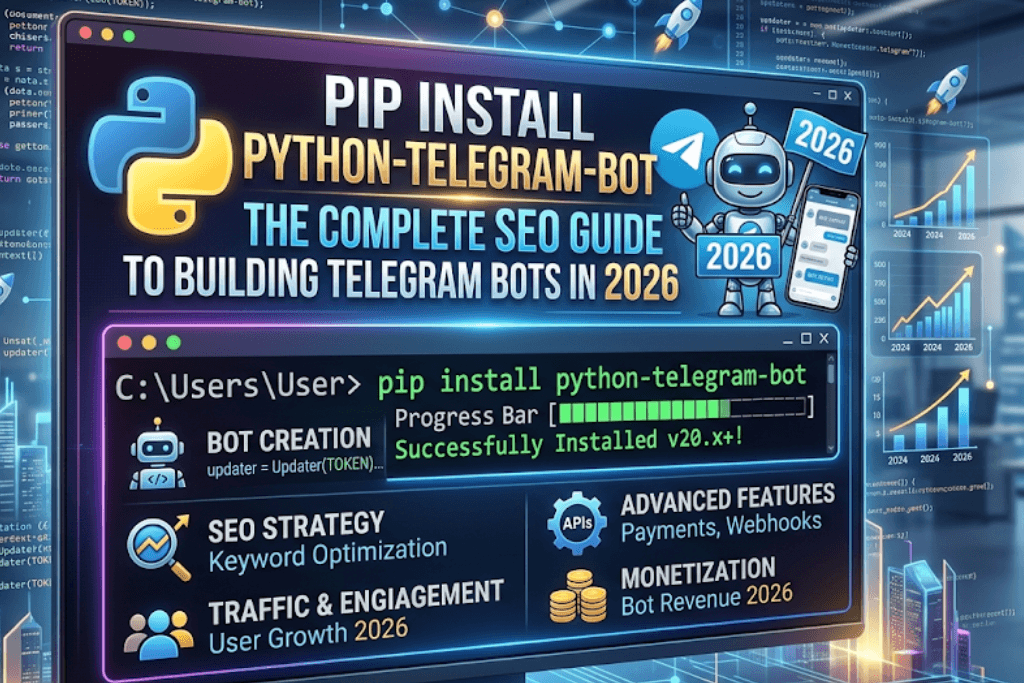
Introduction: Why Python Telegram Bot (PTB) Dominates Bot Development
In the rapidly evolving landscape of instant messaging automation, Telegram stands out as a developer-friendly platform with over 800 million active users. At the heart of Telegram bot development lies the Python Telegram Bot (PTB) library—a powerful, asynchronous framework that simplifies interaction with Telegram’s Bot API. As of 2026, PTB has become the gold standard for Python developers, offering robust features, extensive documentation, and a thriving community.

This guide dives deep into the pip install python-telegram-bot process, covering everything from initial setup to advanced optimization. Whether you’re a beginner automating simple tasks or an enterprise developer building complex conversational AI, This resource ensures you master PTB installation, configuration, and SEO-friendly deployment.
Chapter 1: Understanding Python-Telegram-Bot – Why Pip Install is Non-Negotiable
1.1 What is Python-Telegram-Bot?
Python-Telegram-Bot is a lightweight, pure-Python wrapper for Telegram’s Bot API. Unlike generic HTTP request libraries, PTB provides:
- High-level abstractions for messages, inline keyboards, and file handling.
- Asynchronous support (via
asynciosince v20.0) for high-concurrency bots. - Built-in rate limiting and error recovery.
- Webhook and polling integration.
1.2 Why Pip Install Over Manual Setup?
Manual installation from source is error-prone and time-consuming. The pip install python-telegram-bot command offers:
- Dependency resolution (e.g.,
httpx,anyiofor async). - Version control (pin specific releases like
20.7). - Virtual environment compatibility for isolated projects.
1.3 SEO Advantage of PTB-Powered Bots
Search engines index bot-driven web apps when integrated with frameworks like Flask or Django. PTB’s webhook mode allows you to serve content via https://yourdomain.com/webhook, making your bot’s features discoverable. Properly optimized, a Telegram bot can:
- Drive traffic to landing pages.
- Generate backlinks via shareable command outputs.
- Improve user engagement metrics (dwell time, repeat visits).
Chapter 2: Prerequisites for Pip Install Python-Telegram-Bot
Before running pip install, ensure your environment meets these requirements:
2.1 System Requirements
- Python Version: 3.8 or higher (PTB v20+ requires 3.8+).
- Operating System: Windows 10/11, macOS 11+, or Linux (Ubuntu 20.04+).
- Network: Outbound HTTPS access to
api.telegram.org.
2.2 Creating a Telegram Bot & Getting the API Token
You cannot install PTB without a bot token. Follow these steps:
- Open Telegram and search for @BotFather.
- Send
/newbotand follow prompts to choose a name and username (must end inbot). - Upon success, BotFather replies with an API token (e.g.,
123456:ABC-DEF1234ghIkl-zyx57W2v1u123ew11). - Store this token securely—never hardcode it in public repositories.
2.3 Setting Up a Python Virtual Environment (Recommended)
Isolate your dependencies to avoid conflicts:
# Windows
python -m venv telegram_bot_env
telegram_bot_env\Scripts\activate

# macOS/Linux
python3 -m venv telegram_bot_env
source telegram_bot_env/bin/activate
Chapter 3: Executing Pip Install Python-Telegram-Bot – Step-by-Step
3.1 Basic Installation Command
With your virtual environment active, run:
pip install python-telegram-botThis installs the latest stable version (20.7 as of Q1 2026) along with core dependencies like httpx==0.27.0 and certifi.
3.2 Installing Extras for Advanced Features
PTB offers optional dependency groups:
# For job queues (scheduling tasks)
pip install "python-telegram-bot[job-queue]"

# For webhook support with aiohttp
pip install "python-telegram-bot[webhooks]"

# For full async HTTP/2 performance
pip install "python-telegram-bot[http2]"

# Install all extras
pip install "python-telegram-bot[all]"
3.3 Verifying Installation
Check that PTB is correctly installed:
python -c "import telegram; print(telegram.__version__)"Expected output: 20.7 (or your installed version).
3.4 Upgrading or Downgrading PTB
# Upgrade to latest
pip install --upgrade python-telegram-bot

# Install specific version (e.g., for legacy code)
pip install python-telegram-bot==13.15
Note: PTB v13 (pre-async) vs v20+ (async) have breaking API changes. Always consult the migration guide.
Chapter 4: Your First Bot After Pip Install – Hello World in Async PTB
Now that pip install python-telegram-bot succeeded, let’s build a minimal bot.
4.1 Project Structure
telegram_bot/
├── .env                 # Store token (never commit)
├── bot.py               # Main bot code
└── requirements.txt     # pip freeze > requirements.txt
4.2 Secure Token Handling with Python-dotenv
pip install python-dotenvCreate .env:
BOT_TOKEN=123456:ABC-DEF1234ghIkl-zyx57W2v1u123ew114.3 Complete Async Bot Code (bot.py)
import os
from dotenv import load_dotenv
from telegram import Update
from telegram.ext import Application, CommandHandler, ContextTypes

load_dotenv()
TOKEN = os.getenv("BOT_TOKEN")

async def start(update: Update, context: ContextTypes.DEFAULT_TYPE):
    """Send a welcome message when /start is issued."""
    await update.message.reply_text(
        "Hello! I'm a PTV20+ bot.\n"
        "Try /help to see available commands."
    )

async def help_command(update: Update, context: ContextTypes.DEFAULT_TYPE):
    """Send a help message."""
    await update.message.reply_text(
        "Available commands:\n"
        "/start - Welcome message\n"
        "/help - This help text\n"
        "/echo <text> - Repeat your message"
    )

async def echo(update: Update, context: ContextTypes.DEFAULT_TYPE):
    """Echo the user's message."""
    user_text = ' '.join(context.args) if context.args else "Say something after /echo"
    await update.message.reply_text(user_text)

def main():
    # Create Application object
    app = Application.builder().token(TOKEN).build()

    # Register command handlers
    app.add_handler(CommandHandler("start", start))
    app.add_handler(CommandHandler("help", help_command))
    app.add_handler(CommandHandler("echo", echo))

    # Start the bot (polling mode)
    print("Bot is polling...")
    app.run_polling()

if __name__ == "__main__":
    main()
4.4 Running the Bot
python bot.pyGo to Telegram, find your bot, and send /start. You should receive a response. Leave the script running; your bot is live.
Chapter 5: Advanced Features After Pip Install Python-Telegram-Bot
5.1 Inline Keyboards & Callback Queries
Add interactive buttons:
from telegram import InlineKeyboardButton, InlineKeyboardMarkup, Update
from telegram.ext import CallbackQueryHandler

async def menu(update: Update, context: ContextTypes.DEFAULT_TYPE):
    keyboard = [
        [InlineKeyboardButton("Option 1", callback_data="1")],
        [InlineKeyboardButton("Option 2", callback_data="2")]
    ]
    reply_markup = InlineKeyboardMarkup(keyboard)
    await update.message.reply_text("Choose an option:", reply_markup=reply_markup)

async def button_callback(update: Update, context: ContextTypes.DEFAULT_TYPE):
    query = update.callback_query
    await query.answer()
    await query.edit_message_text(text=f"You selected option {query.data}")

# Add to main()
app.add_handler(CommandHandler("menu", menu))
app.add_handler(CallbackQueryHandler(button_callback))
5.2 Job Queues for Scheduled Messages
from telegram.ext import JobQueue

async def daily_reminder(context: ContextTypes.DEFAULT_TYPE):
    await context.bot.send_message(chat_id=context.job.chat_id, text="Time for your daily update!")

def start_scheduler(application: Application, chat_id: int):
    job_queue = application.job_queue
    job_queue.run_daily(daily_reminder, time=datetime.time(hour=9, minute=0), chat_id=chat_id, name="daily")
5.3 Webhook Mode for Production
Polling (used above) is fine for development. For production with a VPS:
# Replace app.run_polling() with:
async def webhook_setup(app):
    await app.bot.set_webhook(url="https://yourdomain.com/webhook")
    # Run aiohttp server (use uvicorn or similar)

# Typical webhook endpoint with FastAPI:
from fastapi import FastAPI, Request
from telegram import Update

fast_app = FastAPI()
@fast_app.post("/webhook")
async def webhook(request: Request):
    data = await request.json()
    update = Update.de_json(data, bot_app.bot)
    await bot_app.process_update(update)
    return {"ok": True}
5.4 Error Handling & Logging
import logging
logging.basicConfig(level=logging.INFO)

async def error_handler(update: Update, context: ContextTypes.DEFAULT_TYPE):
    logging.error(f"Update {update} caused error {context.error}")
    # Optionally notify admin

app.add_error_handler(error_handler)
Chapter 6: SEO Optimization for Your Python Telegram Bot
While bots themselves aren’t directly crawled, their web interfaces and shared outputs can boost SEO. Here’s how:
6.1 Expose Bot Commands via a Landing Page
Create a simple HTML page describing your bot, its commands, and a direct Telegram link:
<!DOCTYPE html>
<html>
<head>
    <title>My Telegram Bot - Automate Your Tasks</title>
    <meta name="description" content="Install our Python Telegram Bot using pip install python-telegram-bot. Boost productivity with custom commands.">
</head>
<body>
    <h1>My Awesome Telegram Bot</h1>
    <a href="https://t.me/YourBotUsername">Start Chatting</a>
    <pre><code>pip install python-telegram-bot</code></pre>
</body>
</html>
Host this on a domain with good metadata. Google indexes the page, driving traffic to your bot.
6.2 Generate Shareable Content from Bot Responses
Have your bot output unique, keyword-rich text. For example, a bot that generates SEO reports:
async def seo_report(update: Update, context: ContextTypes.DEFAULT_TYPE):
    url = context.args[0]
    # Fetch page title, meta description, etc.
    report = f"SEO Analysis for {url}\nTitle: ...\nKeywords: ..."
    await update.message.reply_text(report)
Users may copy and paste this text elsewhere, creating natural backlinks.
6.3 Use Webhook Mode to Serve Dynamic Content
Combine PTB webhooks with a CMS. Example: When a user sends /blog, the bot fetches recent posts from your WordPress site and returns formatted summaries. These summaries can include internal links to your site.
6.4 Structured Data via Bot Messages
Telegram supports markdown and HTML. Send messages with schema-like formatting:
await update.message.reply_text(
    "🔍 *SEO Tip of the Day*\n"
    "Use `pip install python-telegram-bot` to automate backlink checks.",
    parse_mode="MarkdownV2"
)
6.5 Repository README Optimization
If you open-source your bot, write a README.md targeting keywords like “pip install python-telegram-bot example”. GitHub repositories often rank high on search engines.
Chapter 7: Troubleshooting Common Pip Install Errors
Even with a clean pip install python-telegram-bot, issues arise. Here’s how to fix them:
7.1 SSL Certificate Errors
Error: SSLCertVerificationError or CERTIFICATE_VERIFY_FAILED.
Fix: Update certifi and set environment variables:
pip install --upgrade certifi
export SSL_CERT_FILE=$(python -c "import certifi; print(certifi.where())")
7.2 Asyncio RuntimeError: No Running Event Loop
This occurs when mixing old PTB v13 code with v20. Solution: rewrite handlers as async functions or downgrade to v13.
7.3 Webhook Conflict
Error: Conflict: webhook is already set.
Fix: Delete the webhook before switching to polling:
await app.bot.delete_webhook()
app.run_polling()
7.4 Rate Limiting (HTTP 429)
Telegram limits 30 messages per second per chat. PTB automatically handles retries, but for high-volume bots, implement:
from telegram.ext import AIORateLimiter
app = Application.builder().token(TOKEN).rate_limiter(AIORateLimiter(max_retries=5)).build()
7.5 Dependency Conflicts with Other Libraries
Use pip install --no-deps python-telegram-bot if you already have matching dependencies, but this is rarely recommended. Instead, create a fresh virtual environment.
Chapter 8: Performance Tuning for Production Bots
After successful pip install, optimize your bot for scale.
8.1 Use Async HTTP Client (httpx)
PTB v20 uses httpx.AsyncClient under the hood. Increase concurrency:
from httpx import AsyncClient, Timeout
custom_client = AsyncClient(timeout=Timeout(30.0), limits=httpx.Limits(max_keepalive_connections=100))
app = Application.builder().token(TOKEN).http_client(custom_client).build()
8.2 Database Integration
Store user states in PostgreSQL or Redis instead of memory. Example with Redis:
pip install redisimport redis.asyncio as redis
r = redis.from_url("redis://localhost")
async def store_user(chat_id):
await r.set(f"user:{chat_id}", "active")8.3 Load Balancing for Multiple Bots
Run separate PTB instances behind a reverse proxy like Nginx. Each instance handles a subset of commands using ApplicationBuilder().token(TOKEN).concurrent_updates(True).
8.4 Monitoring with Prometheus
Export bot metrics (update latency, error rate) for Grafana dashboards. Use prometheus-client:
from prometheus_client import Counter, start_http_server
updates_counter = Counter('telegram_updates_total', 'Total updates processed')
start_http_server(8000)
Chapter 9: Security Best Practices After Pip Install
9.1 Never Expose Your Token
Even in .env files, ensure .gitignore includes .env. Use environment variables in production (e.g., AWS Secrets Manager, GitHub Secrets).
9.2 Validate Webhook Secrets
When using webhooks, Telegram sends a X-Telegram-Bot-Api-Secret-Token header. Verify it:
SECRET = os.getenv("WEBHOOK_SECRET")
@fast_app.post("/webhook")
async def webhook(request: Request, x_telegram_bot_api_secret_token: str = Header(None)):
    if x_telegram_bot_api_secret_token != SECRET:
        return JSONResponse(status_code=403)
    # Process update
9.3 Sanitize User Input
Never eval() user-provided strings. For commands like /echo, use html.escape():
import html
safe_text = html.escape(user_text)
9.4 Rate Limit Per User
Prevent abuse with a simple dictionary-based limiter:
from collections import defaultdict
from time import time
user_last_command = defaultdict(float)
async def limited_handler(update: Update, context):
    user_id = update.effective_user.id
    if time() - user_last_command[user_id] < 1:
        await update.message.reply_text("Please slow down.")
        return
    user_last_command[user_id] = time()
    # proceed
Chapter 10: Deploying Your Pip-Installed Bot to the Cloud
10.1 Deploy on Heroku (with Webhooks)
- Create
Procfile:worker: python bot.py(for polling) orweb: uvicorn main:fast_app --host 0.0.0.0 --port $PORT(for webhook). - Set config vars:
heroku config:set BOT_TOKEN=your_token. - Deploy with Git. Ensure
requirements.txtincludespython-telegram-bot.
10.2 Deploy on a VPS (DigitalOcean, Linode)
ssh user@your_vps
sudo apt update && sudo apt install python3-pip
git clone your_repo
cd your_repo
python3 -m venv venv
source venv/bin/activate
pip install -r requirements.txt
nohup python bot.py &
Use systemd for auto-restart.
10.3 Deploy as a Docker Container
Dockerfile:
FROM python:3.11-slim
WORKDIR /app
COPY requirements.txt .
RUN pip install -r requirements.txt
COPY . .
CMD ["python", "bot.py"]
Build and run:
docker build -t telegram-bot .
docker run -d --env-file .env telegram-bot
10.4 Serverless with AWS Lambda (Limited Use)
PTB’s long polling doesn’t fit Lambda’s timeout (15 min max). Instead, use webhooks with API Gateway. The python-telegram-bot package size may exceed Lambda limits; consider using Lambda Layers.
Chapter 11: Future-Proofing Your Bot – PTB v20+ vs v13
| Feature | PTB v13 (Legacy) | PTB v20+ (Current) |
|---|---|---|
| Paradigm | Synchronous + ThreadPool | Asynchronous (asyncio) |
| Installation | pip install python-telegram-bot==13.15 | pip install python-telegram-bot |
| Performance | Lower concurrency | High concurrency (1000+ updates/sec) |
| Dependency | urllib3 | httpx |
| Webhook | Tornado optional | Native aiohttp/FastAPI |
Migration tip: Replace dispatcher with Application, and convert all handler functions to async def. Use context.bot.send_message() instead of update.message.reply_text() for full control.
Chapter 12: Real-World Use Cases & Monetization
12.1 Customer Support Bot
Integrate PTB with Zendesk or Freshdesk API. Users send /ticket My issue... and the bot creates a support ticket.
12.2 E-commerce Alert Bot
Monitor your Shopify store for new orders. Use PTB’s JobQueue to send daily sales summaries to your Telegram channel.
12.3 SEO Monitoring Bot
Combine PTB with Google Search Console API. Schedule weekly keyword rank reports and send them as formatted tables.
12.4 Monetization Strategies
- Freemium commands:
/advanced_reportrequires a paid subscription via Telegram Stars (Telegram’s native payment system). - Affiliate marketing: Bot recommends products with your affiliate links.
- Donations: Add
/donatecommand linking to Buy Me a Coffee.
Conclusion: Mastering Pip Install Python-Telegram-Bot
The journey from pip install python-telegram-bot to a production-grade, SEO-optimized Telegram bot is both straightforward and scalable. By leveraging PTB’s asynchronous architecture, robust error handling, and seamless webhook integration, you can build bots that serve millions of users efficiently.
Final checklist for success:
- Always use virtual environments.
- Keep your bot token secret.
- Prefer async patterns (PTB v20+).
- Optimize for search engines via landing pages and shareable outputs.
- Monitor performance with logging and metrics.
Further Resources: